

Why PCI Network Diagrams Matter
It’s not uncommon for organizations to underestimate the importance of developing PCI network diagrams. Your company’s network diagrams are a critical component of your PCI compliance program and should not be overlooked or underdeveloped.
PCI DSS Requirements for Network Diagrams
According to requirement 1.1.2 of the Payment Card Industry Data Security Standards (PCI DSS), your company must have “a current network diagram that identifies all connections between the cardholder data environment and other networks, including wireless networks.” For requirement 1.1.3, you must have “a current diagram that shows how all cardholder data flows across systems and networks.”
How Network Diagrams Define Your CDE Scope
These diagrams are important for two reasons:
- First and foremost, they are intended to be tools for your team to better understand your company’s scope of compliance by illustrating the critical components of your cardholder data environment (CDE) and how cardholder data flows through the CDE.
- They also help your assessor understand where cardholder data is stored, processed, and transmitted in order to confirm whether you’ve properly defined your CDE.
We tend to look at these PCI DSS requirements simply to prove compliance, but they’re also in place to help us. Network diagrams ensure that both your team and your assessor are clear on what is and isn’t within scope.
Your compliance team is responsible for knowing exactly where CDE systems are located in the corporate network environment and how cardholder data moves throughout the environment. The goal of your network diagrams is to synthesize that information into an easy-to-understand illustration of your CDE.
A poorly designed or incomplete network diagram can signal that your team does not fully understand its environment — something assessors often interpret as a broader compliance risk. This gap is often a sure sign to an assessor that he or she should be on the lookout for potentially deeper issues.
Key Qualities of Effective PCI Network Diagrams
We’re here to help you understand how to best meet Requirements 1.1.2 and 1.1.3. Here are a few qualities of effective PCI network diagrams.
Keep the Diagram Simple and Easy to Understand
Often, we see network diagrams that go into too much detail about the individual system, network segment, and connectivity elements. The overload of information can make it difficult to distinguish between in-scope and out-of-scope components or to follow the flow of cardholder data through the environment.
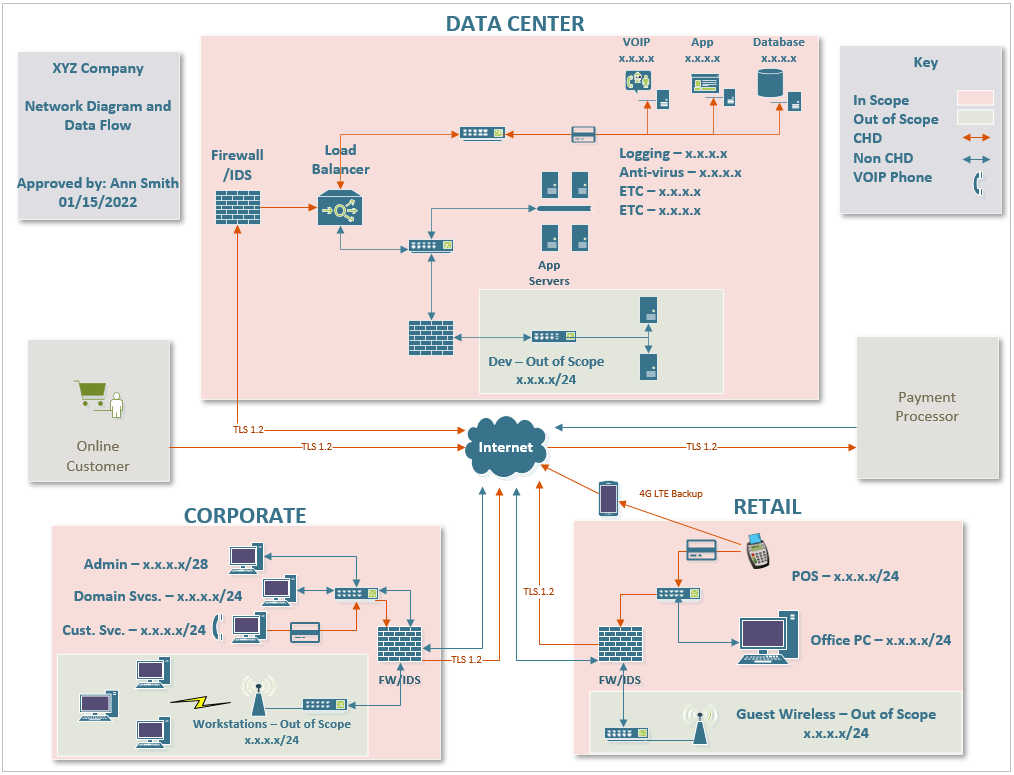
Good PCI network diagrams, as seen below, should be easily understood by someone who is not familiar with the network environment and/or an information technology expert. People who are unfamiliar with the network should be able to easily identify systems, network segments, and the flows of credit card data that comprise your CDE.
Elements of a simple network diagram include:
- A clear indication of what is and is not in scope. Color-coding is very effective for this.
- A minimal structure with only necessary details. Start simple and add only as much detail as needed to represent the critical components of the CDE.
- A simple key that explains symbols, data flow paths, and color-coding.
It’s human nature to over-explain in an attempt to cover all our bases. While it’s important to present a full picture of your CDE, it’s just as important not to muddle the information with unnecessary, distracting details.
Clearly Show the CDE and Cardholder Data Flow
The keyword here is “clearly” and should go hand-in-hand with simplicity.
Your team will use symbols, pictures, and color-coding to illustrate your CDE and how data flows through it. Using appropriate symbols for types of systems or groupings of systems, and boxes or shading around network segments and physical locations is very helpful. Also, use brief descriptions of these elements (e.g. Internet Firewall, Account Database Server, or DMZ Network) in addition to or instead of system or network names. While FWADSRV001 may make perfect sense to you, to the unfamiliar reader it may not. As mentioned before, include a key with your diagram for others to easily decipher symbols and color-coding.
A common problem is that network diagrams show where systems are located and how they’re connected (meeting Requirement 1.1.2) but fail to illustrate how cardholder data moves through the environment (Requirement 1.1.3). A strong PCI network diagram should clearly show where cardholder data enters, how it travels, where it is stored, and where it exits.
Remember, your diagram should include all critical systems that play a role in storing, processing, or transmitting cardholder data and provide a clear understanding of where they are located. In accordance with Requirement 2.4, your organization should maintain an inventory of in-scope system components. This inventory will be integral in identifying the critical systems to be clearly represented in your diagram.
Keep PCI Network Diagrams Updated with Environment Changes
Diagrams that are consistently updated show that there is a sufficient level of oversight for compliance and that the team is aware of their standing. As changes are made to your CDE, ensure that your team is modifying the network diagram to reflect those changes.
You should schedule regular reviews of your PCI network diagrams to ensure they’re up to date. Don’t wait until your annual assessment to find out all the ways the environment has changed over the last year, and that those changes have significantly affected your scope of compliance! The PCI DSS does not specify frequency but scheduling semi-annual reviews would be a good start.
Because there is likely more than one person contributing to these diagrams, it is also helpful to add version and permission-based controls to your document. This step will keep versions of your diagram consistent. Your team will need to document the date of each diagram modification to show your assessor that it’s current.
PCI compliance is more than a once-per-year assessment. Compliance requires your team to have a well-rounded understanding of its CDE and to adjust as changes are made. An up-to-date diagram makes it clear to your assessor that your company is actively monitoring your CDE to meet your PCI compliance objectives and not simply going through the motions when your assessment comes around.
It may feel as though PCI requirements are making your life more difficult, or that you’re having to jump through hoops to stay compliant. The reality of compliance, though, is that these requirements are there to help you and, more importantly, your customers and business partners who are relying on you to keep their data secure.
Example of a PCI Network Diagram
Strengthen Your PCI Compliance Strategy
PCI compliance requires a clear understanding of your environment and how cardholder data moves through it. Well-designed PCI network diagrams play a critical role in reducing risk and ensuring your scope is accurately defined.
If you’re unsure whether your diagrams fully reflect your environment or meet current PCI DSS requirements, it may be time for a closer look.
Contact our cybersecurity team to review your PCI network diagrams, identify gaps, and strengthen your compliance posture before your next assessment.
PCI Network Diagram FAQs
Why are PCI network diagrams so important for compliance?
Network and data-flow diagrams are required by PCI DSS because they show exactly where cardholder data is stored, processed, and transmitted, and how it connects to other networks. Clear diagrams help your internal team understand scope and help assessors verify that you’ve correctly defined your CDE and boundaries.
What’s the difference between a network diagram and a data-flow diagram for PCI?
A network diagram shows systems, segments, and connections (such as firewalls, DMZs, and CDE components). A data-flow diagram focuses on how cardholder data enters, moves through, is stored in, and leaves the environment. Both views are needed to fully meet PCI requirements and to avoid hidden in-scope systems.
How detailed should a PCI network diagram be?
It should be detailed enough for someone unfamiliar with your environment to see which systems and segments are in scope and to follow the path of cardholder data, but not so detailed that it becomes cluttered and confusing. Grouping similar systems, using plain-language labels, and including a legend for symbols and color-coding are usually more effective than listing every host.
How often should we update our PCI network diagrams?
You should update diagrams whenever there is a change that affects the CDE or connectivity to it—such as new systems, new payment channels, network re-segmentation, or moving services to the cloud. In addition, most organizations schedule at least semi-annual or quarterly reviews so they’re not discovering scope changes right before an annual assessment.
What common mistakes do organizations make in PCI network diagrams?
Frequent issues include: showing only network topology but not cardholder data flows; failing to clearly mark what is and isn’t in scope; using internal system names that mean nothing to outsiders; leaving out third-party or cloud connections; and letting diagrams become stale so they no longer match the actual environment.
Do we need separate diagrams for cloud and on‑premise CDE components?
You don’t have to separate them, but many organizations find it helpful to show cloud and on‑premise CDE elements clearly—either on a single diagram with distinct sections and labels, or on linked diagrams. The key is that assessors can easily see all in-scope components and data flows, regardless of where they’re hosted.


